
Eliminating Manual Transcription
Cable assembly or wiring harness design often begins with "dead" data like PDF pinouts, Excel wiring schedules, and ECAD exports. Traditionally, getting this data into a design tool requires manual entry—reading a pin label from a datasheet and typing it into a component editor.
The Splice CAD MCP Server uses the Model Context Protocol to bridge AI agents (like Claude) directly to the Splice CAD workspace. Instead of the agent describing a design in text, it executes the design operations—creating components, mapping pins, and routing conductors—directly on the Splice CAD canvas.
Technical Architecture
The server runs locally and provides a set of 27 tools to any MCP-compliant AI client. Communication is split into two paths to balance data access with local privacy:
- Cloud API: Used for global part searches (Splice database) and project persistence at
splice-cad.com. - Local WebSocket Bridge: The agent sends canvas commands to the MCP server, which proxies them to your open browser tab via
localhost. Canvas layout and command data do not leave your machine.
Capabilities & Workflows
Live Canvas Updates
The WebSocket bridge allows for real-time manipulation of the design.
- Atomic Operations: Agents can batch dozens of operations (placing 20 connectors, routing 50 wires) into a single execution block.
- Undo/Redo Integration: Every agent-initiated batch is treated as a single step in the Splice undo history (Ctrl+Z).
- State Awareness: The agent can "read" the current canvas state to understand component positions and connectivity before making changes.
Use Cases
- Datasheet Extraction: Hand an agent a connector datasheet; it extracts the pinout, fetches metadata from DigiKey, and generates the component in your library.
- Schematic Translation: Point an agent at a KiCad or PDF schematic. It identifies external interfaces and generates a multi-page plan layout organized by subsystem.
- Automated Layout: Agents can read component coordinates, identify overlaps, and execute alignment or distribution commands to clean up a messy plan.
- Wiring Schedule Import: The agent parses CSV/Excel wiring schedules and automatically creates the corresponding conductors between existing components.
Real-World Workflows
- From PCB Schematic to Mating Design: Point the agent at an image or PDF of a PCB schematic. It identifies connector designators (e.g., J1, J2) and pin functions, then creates mating components on the Splice canvas with the correct pin counts and labels — giving you a starting point to assign parts and begin wiring.
- Rapid Pigtail Generation: Hand the agent a connector datasheet PDF. It extracts the pinout and creates the component in your library, then automatically generates a pigtail assembly (flying leads) with correct wire gauges and labels — ready for you to terminate as needed.
- Harness Topology Regeneration: Point the agent at an existing, messy design. It can analyze the current connectivity and regenerate the layout from scratch, optimizing component placement and wire routing to improve visual clarity or manufacturing logic.
- Spreadsheet-to-Canvas Automation: Provide a wiring schedule in CSV or Excel format. The agent parses the
From/Tocolumns, identifies the required parts, and builds the entire system architecture on the canvas in a single batch operation.
Installation & Setup
Full installation instructions for Claude Code, Claude Desktop, Cursor, Windsurf, and other MCP clients are in the GitHub repository.
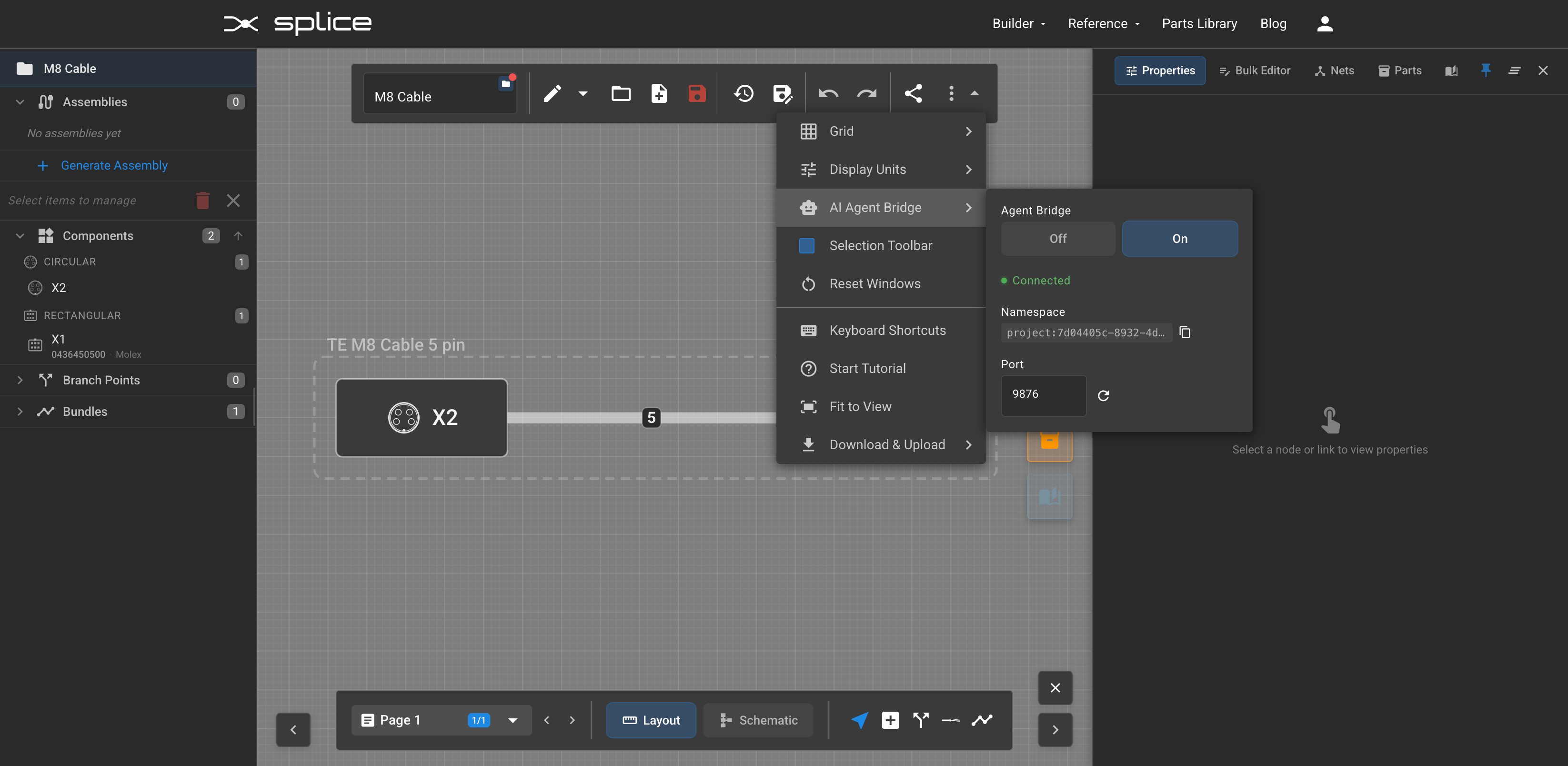
Once the MCP server is configured in your AI client, open your project in Splice and enable the bridge: Settings → AI Agent Bridge → On. When the agent connects, you'll see a green "Connected" indicator. The bridge runs on localhost (default port 9876) — all canvas command data stays on your machine.
Tool Categories
| Category | Description |
|---|---|
| Parts | Search connectors/cables by MPN or specs. |
| Project | Manage projects, sub-projects, and plan versions. |
| Canvas | Execute live move, draw, and delete commands; read current state. |
| Generation | Trigger the transition from logical plans to physical assemblies. |
Documentation: Every tool is self-documenting via the MCP schema, providing the agent with parameter types and valid ID formats automatically.