Generic Components
Add components that don’t exist in the library directly from the Harness Builder. Use category templates for quick schematic-style symbols, or upload your own image for a custom look.
Creating a Generic Component
- Open the Components floating panel by clicking the connector icon on the right side of the canvas, or press C
- Click the Create button in the panel header
- Select a category template from the dropdown (power supply, circuit breaker, relay, contactor, fuse, switch, push button, fan, motor, timer, PCB, etc.) to use a built-in schematic symbol, or start from scratch
- Set the number of positions for your component
- Optionally enter an MPN and click the magic wand button to auto-fill details from Digi-Key (manufacturer, description, datasheet, image)
- Keep the category template icon, or upload/paste your own custom image (SVG or PNG)
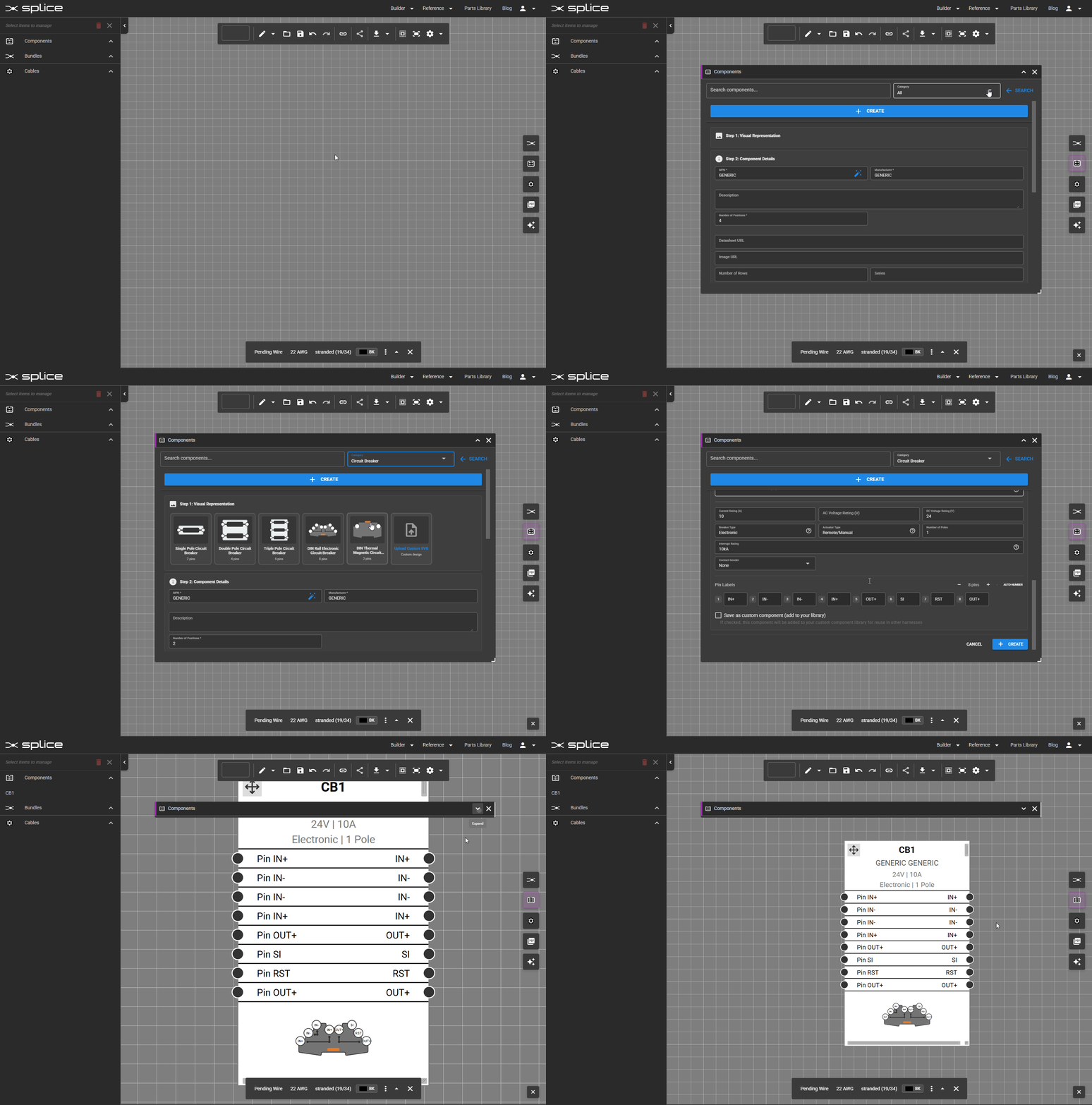 Create a generic component directly from the Components panel.
Editing a Generic Component
To modify a generic component after adding it to the canvas:
- Right-click the component and select Edit Properties
- Or click the tune icon in the component’s toolbar when selected
You can update the category, number of positions, part details, and custom graphics at any time.
Component Categories
Available categories include:
- Circuit Breakers: Overcurrent protection
- Fuses: One-time overcurrent protection
- Push Buttons: Momentary and latching controls
- Switches: Manual control elements
- Relays: Electromechanical switching
- Contactors: Heavy-duty power switching
- Power Supplies: Voltage conversion modules
- Motors: Electric motor components
- Fans: Cooling and ventilation
- PCBs: Printed circuit boards
- Resistors: Fixed and variable resistors
- Capacitors: Energy storage components
- Diodes: Rectifiers and semiconductor switches
- Inductors: Coils and chokes
- Transformers: Voltage transformers
- Inverters: DC-to-AC conversion
- Splices: Wire joining and connections
- Batteries: Power cells and packs
- Solar Cells: Photovoltaic modules
- Sensors: Temperature, pressure, proximity, and other sensors
- Solenoids: Electromagnetic actuators
- LEDs: Light-emitting diodes and indicators
- Speakers: Audio output devices
- Heaters: Heating elements
- Thermostats: Temperature control devices
- Potentiometers: Variable resistors
- Generators: Alternators and generators
- Indicators: Lamps, pilot lights, and annunciators
- Grounds: Grounding and earth connections
- Other: Miscellaneous components
Shape-Based Categories
You can also browse connectors by shape:
- Circular: Round multi-pin connectors
- Rectangular: Rectangular connectors
- D-Sub: D-subminiature connectors
- Terminal Block: Barrier strip connectors
- Ferrule: Wire-end sleeve terminals
- Quick Disconnect: Blade-style push-on terminals
- Ring Terminal: Ring and lug terminals
- Spade: Spade and fork terminals
- Lug: Heavy-duty lug terminals
- USB: Universal Serial Bus connectors
- Barrel: Barrel/DC power connectors
- Header: Pin header connectors
- Coaxial: RF and coaxial connectors
- RJ/Modular: RJ11, RJ45, and modular jack connectors